Accelerating the Process Through a Design Token Workflow
Challenge
Website projects such as “SisterStyle Events,” a small business specializing in floral arrangements and the rental of decorative items, presented a unique requirement: the extensive color system needed to be able to adapt automatically to the seasons.
The foundation for this was already in place. The problem, however, lay in maintenance: Until now, every change had to be manually applied to numerous components. Especially with many color variations and different UI states, this not only increases the effort involved but also the risk of overlooking individual elements.
A structured design token system was therefore needed to centralize the design process while also laying the groundwork for automated seasonal color changes.
User Research
The actual research had already been conducted as part of the website project and did not need to be repeated for the development of the token system.
One key finding was that the seasonal color change is not only technically interesting but also offers visible added value for the website: The changing color schemes create a visual surprise effect and pique curiosity.
To ensure this change functions reliably, colors, shades, and their use in the components had to be systematically mapped using tokens.
Concept and Implementation
Design & Structure
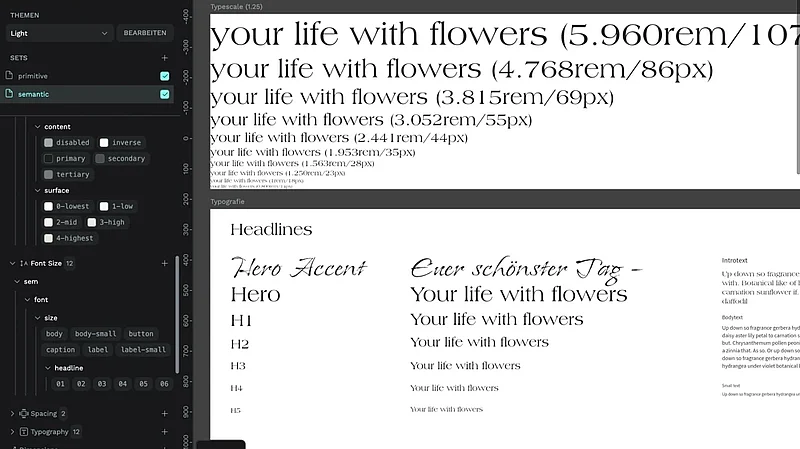
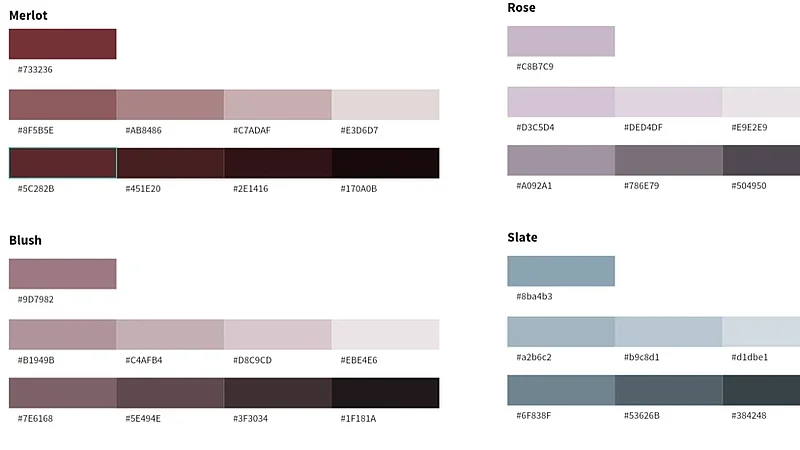
The project’s previously defined design guidelines served as the foundation—including colors and their shades, typography, sizes, spacing, and other visual characteristics.
A hierarchical token structure was derived from these guidelines:
- Primitive tokens for basic values such as colors, font sizes, or spacing
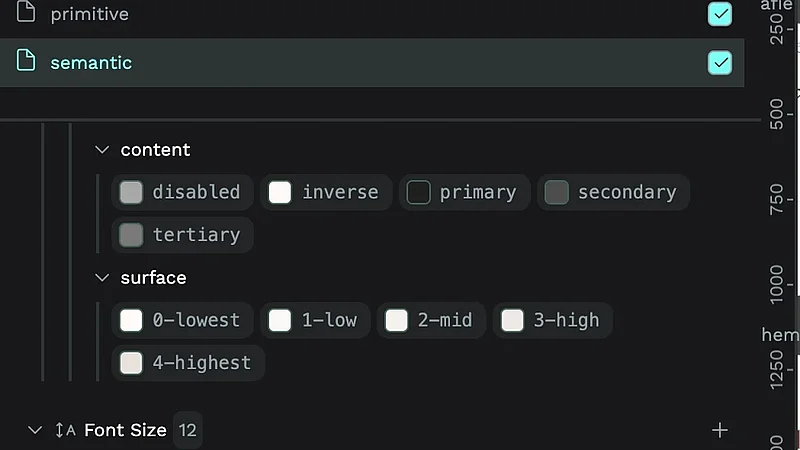
- Semantic tokens for their specific meaning within the interface
- Component tokens for use within individual UI components
The central source is a `tokens.json` file currently containing 152 design tokens:
| Kategorie | Anzahl |
|---|---|
| Color Tokens | 99 |
| Font Sizes | 21 |
| Typography Tokens | 12 |
| Spacing Tokens | 9 |
| Border Radius Tokens | 5 |
| Dimension Tokens | 2 |
| Font Families | 2 |
| Font Weights | 2 |
| Total | 152 |
Of these, 55 are alias tokens. They represent semantic roles rather than duplicating raw values. This allows, for example, a color to be changed in one central location without having to adjust every instance individually.
The tokens were initially created in Penpot. However, this was not done entirely manually: given the large number of tints and shades, that would have been unnecessarily time-consuming.
Instead, the token structure was also formatted as JSON. AI tools were then able to quickly generate, optimize, and expand large quantities of tokens. This transformed what could have been a highly repetitive task into a significantly more efficient process.
Development
For the technical implementation, a React project was set up and Style Dictionary was integrated. This allowed the defined tokens to be automatically converted into CSS custom properties.
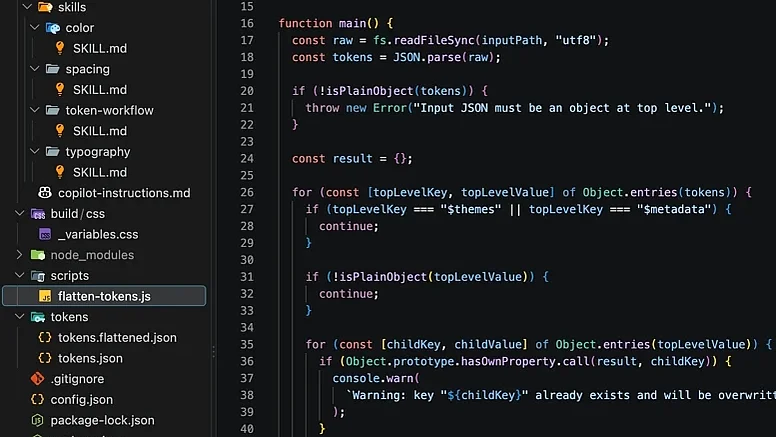
One challenge was that the existing nesting structure of the token.json file was not directly compatible with the desired build process. The first set levels had to be removed so that Style Dictionary could work with the actual Primitive, Semantic, and Component levels.
To achieve this, an AI-powered script was developed that automatically flattens the JSON nesting before the actual build process.
The resulting CSS custom properties were then written to a read-only CSS file and validated.
AI-Driven Optimization
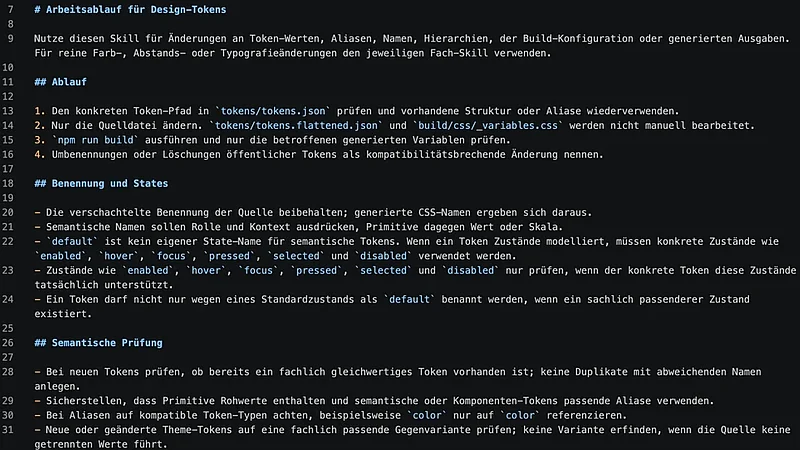
Optimization was not a separate step but an integral part of the entire tokenization process.
To ensure the AI could be used in a targeted and consistent manner, we defined custom skills and Copilot instructions. These provide the AI with the necessary context about the project and describe the rules for the various tokenization areas without having to define every single token in advance.
This allowed me to have Copilot take on specific tasks such as these:
- filling in missing states
- generating color gradients
- accounting for typical UI elements
- checking and optimizing token structures
- detecting inconsistencies
- expanding or adapting existing tokens
Based on the task at hand, the AI could decide for itself which skill was needed—for example, for colors, typography, or spacing.
This significantly reduces the overhead associated with individual prompts. Instead of including all relevant rules in every instruction, the necessary context is already available project-wide.
The result is a significantly more efficient workflow: recurring tasks can be completed faster, while the consistency of the system is improved at the same time.
Testing & Validation
The token generation process was not only automated but also supplemented with validation steps.
After the build process, the generated tokens are checked. This allows missing or inconsistent definitions to be identified and subsequently corrected in a targeted manner.
I also iteratively reviewed and optimized the defined skills and instructions. This enabled me to gradually improve the AI-powered workflow and better align the results with the requirements of the design system.
Accessibility
Accessibility has also been integrated into the AI-powered workflow.
Since not every project is designed to be fully accessible, relevant guidelines have been included in the instructions. This is intended to help the AI flag issues such as problematic color combinations, problematic font sizes, or other relevant aspects when processing the tokens.
This check is intentionally performed at the design and token process level. The build process itself does not perform a comprehensive accessibility check.
Result
The system currently comprises 152 design tokens, 55 of which are semantic alias tokens.
The key advantage becomes apparent when comparing the effort required for comparable token sets. Based on a defined effort estimate, the following comparison emerges:
| Arbeitsweise | Aufwand pro Token | Aufwand für 152 Tokens |
|---|---|---|
| Manual, without a defined process | approx. 5.5 min. | approx. 13,9 hrs. |
| Skill Workflow + automated build | approx. 1,8 min. | approx. 4,6 hrs. |
| Time saved | approx. 3,7 min. | approx. 9,3 hrs / 67 % |
Thus, the skill-based workflow reduces the estimated maintenance and processing effort by approximately 67%—for a comparable token set, this corresponds to a time savings of about 9 hours.
There are additional benefits as well:
- Tokens can be created, expanded, and customized much more quickly.
- Large numbers of color variants, states, and gradients can be generated automatically.
- Changes can be managed centrally via the token structure.
- Repetitive tasks are significantly reduced through AI support.
- The structured token base lays the groundwork for automated seasonal color changes.
- The token JSON can be used as a central database and then transferred back into design tools such as Penpot or Figma.
This creates a workflow in which design and development are much more closely linked—without having to maintain each element multiple times manually.
Conclusion
In this project, design tokens have proven to be not only a structuring tool but also a concrete productivity driver.
The combination of a structured token system, automated build processes, and AI support reduces the estimated workload by approximately 67% while simultaneously creating a more consistent foundation for design and development.
What I found particularly exciting was the realization that AI can be used for more than just generating individual tokens. With well-defined skills and project instructions, it’s possible to build a complete workflow in which the AI handles recurring tasks while adhering to defined quality and accessibility rules.
In addition to the concrete results for the project, this also allowed me to delve much deeper into the practical application of AI-supported design and development processes—an experience I intend to leverage specifically in future UX engineering projects.