94% positive response to the booking route
Challenge
The old booking process for a wellness area was confusing, slow, and prone to errors. Customers often failed to successfully book their desired suite because any change required restarting the entire process. Frequent complaints clearly indicated dissatisfaction. The challenge was to design a new booking flow that is intuitive, fast, and flexible, significantly improving customer satisfaction.
User Research
Data Sources:
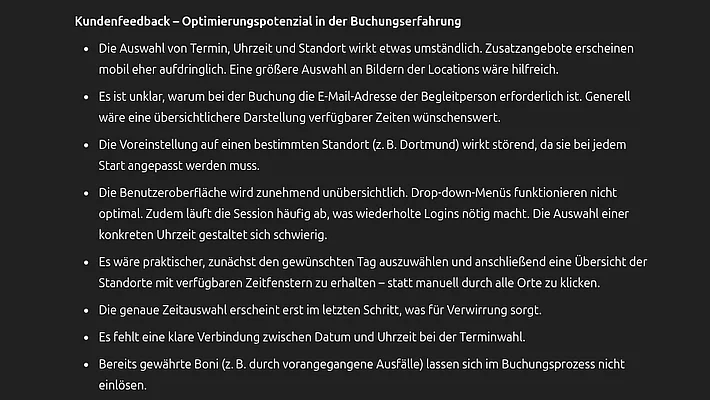
- Collected and analyzed customer feedback and email communications from the past six months (Fig. 3).
Interviews:
- Conducted interviews with service and customer-facing departments to gain additional perspectives on common issues and user expectations.
Pain Points:
- Difficulties selecting the correct start time often led to booking errors and drop-offs.
- Frustrating booking process without the option to save progress caused user dissatisfaction.
Research Questions:
- At what points do users abandon the booking process?
- What information is missing or unclear?
- How important is the ability to make changes during the booking flow?
- What are users’ expectations regarding speed and clarity?
Concept and Implementation
Content & Structure:
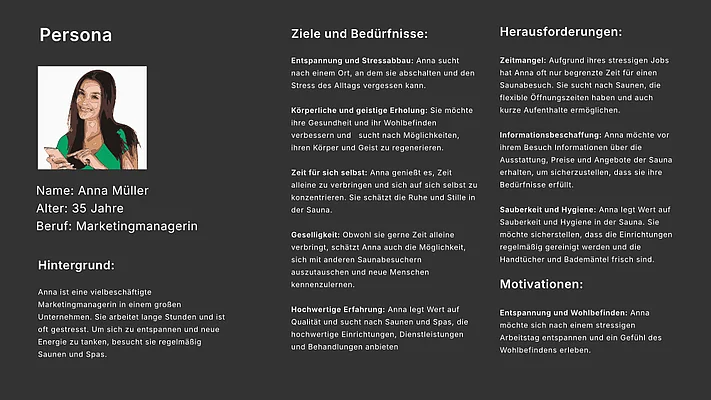
- Developed a persona based on AI analysis (Fig. 2) to clearly define user needs.
- Created initial sketches of the user flow focused on minimizing clicks and maximizing clarity.
- Built a clear information architecture that allowed flexible changes during the booking process.
Design & Development:
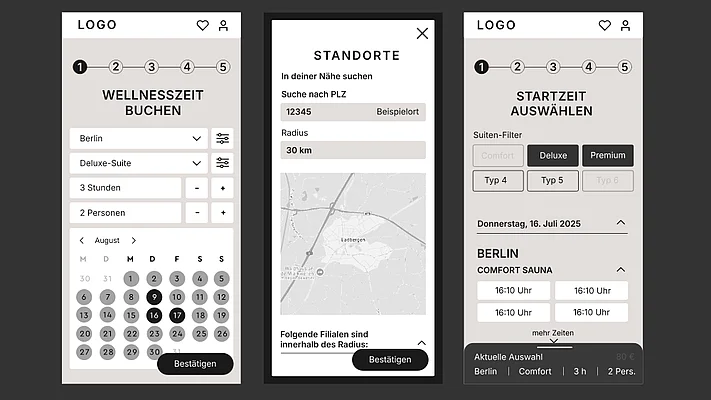
- Created low-fidelity wireframes in Figma for early alignment (Fig. 1).
- In close collaboration with the design department, I first developed a prototype and then created and further expanded the design system using those components.
- Implemented the front end of the booking flow using React, HTML, and CSS, adhering to modern UX best practices.
- Closely coordinated with the backend team to ensure fast load times and smooth functionality.
Optimization:
- Prioritized page speed optimization: reduced load times in both frontend and backend.
- Introduced flexible adjustment options during the booking flow, especially for selecting start times.
Testing and Validation
- Iteratively evaluated pages and components using heuristic evaluations and 5-second tests to optimize clarity.
- Conducted usability tests internally and externally with real customers.
- Continuously validated usability based on direct feedback and expert reviews.
- Checking accessibility with the help of a specialized external agency, which then created task tickets for problems.
Accessibility
Objective and Scope
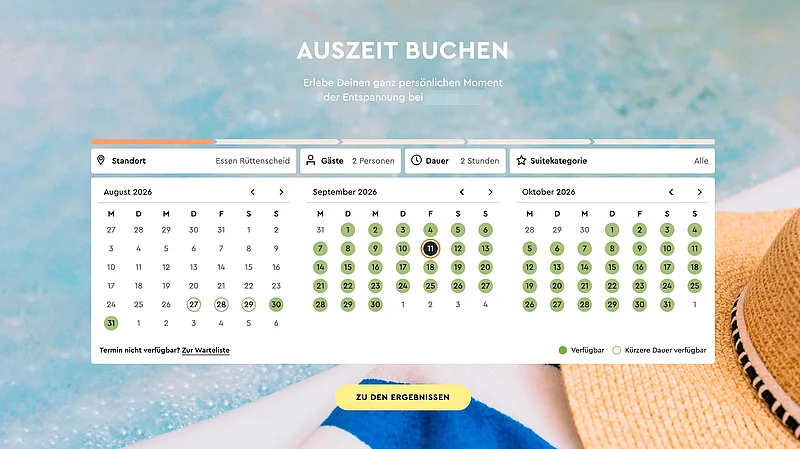
I reviewed the current state of the entire booking and checkout process with regard to its accessibility. Particular emphasis was placed on the appointment selection via the interactive calendar on the homepage, as this complex, dynamically generated component posed special challenges for keyboard navigation and screen reader use.
In addition to manual testing, I utilized automated tests and collaborated with an external service provider that provided specialized tools for identifying and classifying accessibility issues.
I based the tests on at least WCAG Level AA. Where the tools supported it, I supplemented the tests with additional accessibility best practices.
Since the app was built on React, I was unable to test against the Authoring Tool Accessibility Guidelines (ATAG); instead, I had to manually ensure correct input and the creation of page titles using Helmet for React.
Automated Accessibility Tests
I used automated tests early in the development process to identify accessibility issues as early as possible. In my React development, I used tools such as eslint-plugin-jsx-a11y to detect missing or problematic attributes—such as alt text—directly in the code.
In addition, I used the Axe Accessibility Linter in the Visual Studio Code environment to check the resulting HTML structure for potential accessibility issues even during development.
For the completed booking flow, I used tools such as axe-core and WAVE to check the individual pages separately. This process identified issues such as incorrect landmarks, problematic heading hierarchies, and missing or inappropriate alternative text.
In collaboration with an external service provider, I also set up specialized automated test workflows. This made it possible to test areas that were only accessible through user interactions, such as the login area and the checkout process, including payment.
I did not rely solely on automated testing for quality control. I subsequently reviewed the identified issues manually, paying particular attention to keyboard navigation and screen reader output.
Manual Accessibility Testing
Manual testing was an essential part of the review process and was performed repeatedly both during development and after individual issues were resolved.
I tested the entire user flow of the booking process using the keyboard, paying particular attention to the sequence of interactions and the accessibility of individual controls. In addition, I used VoiceOver on macOS to navigate through the individual pages with a screen reader while simultaneously checking keyboard navigation and the information being read aloud.
For example, I not only verified whether an `alt` attribute was present, but also whether its content was actually meaningful to screen reader users. For decorative images and icons, however, I examined whether the screen reader needed to read them aloud at all.
Dynamically generated content and button labels were also checked manually. Especially for the calendar, it was important that the individual controls were named in a way that screen readers could understand and that state changes were announced in a clear and comprehensible manner.
Identified Issues and Technical Remediation
Based on the automated and manual tests, I made various technical and visual adjustments.
- Keyboard Navigation and Focus
I added a clearly visible, high-contrast focus ring to interactive elements such as buttons and input fields. This made it possible to clearly identify the currently focused position even when using only the keyboard. (WCAG 2.4.7)
- Semantic HTML and Structure
Non-semantic HTML and incorrect nesting of labels were corrected. The dynamic React structure caused inconsistent hierarchies in the headings. (WCAG 1.3.1) I adjusted the generation accordingly so that the headings were displayed in the intended order without unnecessary jumps. (WCAG 4.1.2)
- Accessible Names and ARIA
For the calendar in particular, I revised the labels of the interactive elements so that their functions would be clearly conveyed to screen reader users. To this end, I added or corrected ARIA attributes and used appropriate labels for dynamically generated content. For accordion components, I also ensured that associated content became visible or accessible to screen readers only upon the appropriate interaction.
- Images and Icons
I reviewed images and icons individually to determine whether they served an informative purpose or were purely decorative. Decorative icons were removed from the screen reader output using `aria-hidden=“true”`. For buttons consisting solely of an icon, however, a clear label was required. In these cases, I added appropriate text that was accessible to screen readers without altering the visual appearance of the component. (WCAG 4.1.2)
- Contrast and Typography
In various places, I adjusted the contrast between the text and the background. In particular, gray text on light gray backgrounds was adjusted. In some cases, the font weight was also changed to a more legible “Medium” variant. (WCAG 1.4.3) Help texts relevant to operating or understanding the process were increased from 14 px to 16 px. I also used the browsers’ built-in standard features to enlarge the font or simulated various color vision deficiencies using browser tools (e.g., DevTools in Chrome) to ensure that everything remained readable.
- Dynamic Content and Live Regions
I used Live Regions for dynamically updated dates and times. This allowed changes to be announced in a way that screen reader users could follow. (WCAG 4.1.3) Depending on the significance of the change, I adjusted the output so that relevant updates were announced immediately and did not have to be noticed only after other content had been read aloud.
Validation of the Changes
After the technical implementation, I re-checked the changes using automated tools as well as through manual keyboard and screen reader tests.
In doing so, I went through the booking process again step by step, paying particular attention to the areas that had previously been problematic. The automated tests served as an additional check, while the manual testing ensured that the corrected components could indeed be meaningfully operated and understood using a keyboard and screen reader.
The results of the tests and the resulting corrections were documented. After completing the planned remediation, the accessibility statement was updated and published accordingly.
Final version
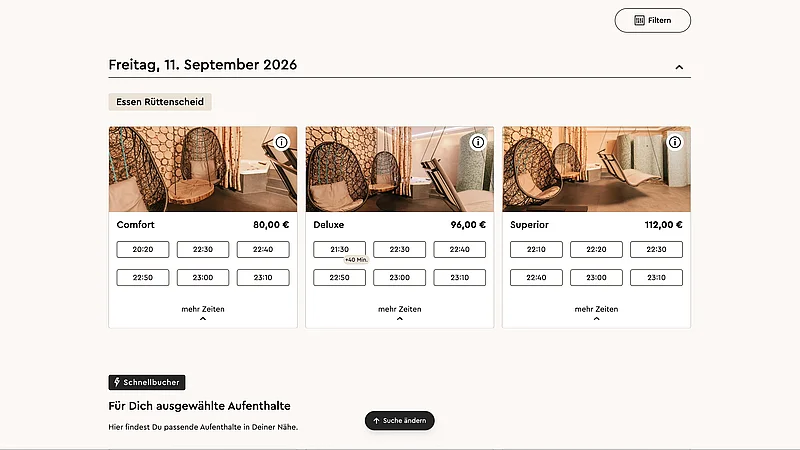
Result
- 94% positive customer feedback during a live test involving 468 test customers.
- Significantly fewer complaints at the service center regarding the booking process.
- Faster and more user-friendly booking experience leading to higher conversion rates.
- Received an internal award for outstanding commitment, exceptional results, and excellent collaboration across departments.
Summary
- The project has clearly shown that real user research - especially through the evaluation of real customer experiences - forms an indispensable basis for well-founded design decisions. Pure expert knowledge is not enough to fully understand complex user needs.
- The systematic consideration of accessibility led to an improved user experience for all target groups - not just for people with disabilities. Inclusive design is a key quality factor, especially in public, widely used systems.
- Another key success factor was the close collaboration with specialist departments from service, technology and design. The diverse perspectives made it possible to identify relevant problems at an early stage and develop practicable solutions - an integrative process that ultimately contributed to the high level of acceptance and positive response to the new booking route.